





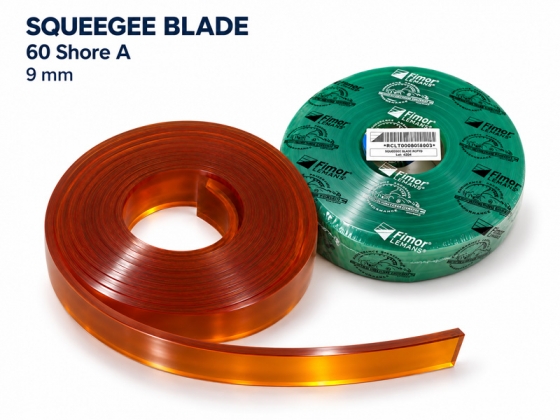
Screen printing squeegee blade 9mm 60 Shore A
- Soft, flexible blade
- Supports higher ink deposition
- Suitable for thick ink deposits
- Supports special-effect printing
Product details
The screen printing squeegee blade is mounted in a squeegee holder and forces ink through the mesh openings in the image areas of the stencil onto the substrate.
With a thickness of 9 mm and a hardness of 60 Shore A, this product is suitable for jobs requiring a soft, flexible blade and prioritizing ink transfer through the mesh. When combined with suitable ink, mesh and stencil specifications, it supports thick ink deposits and selected decorative effects on textiles.
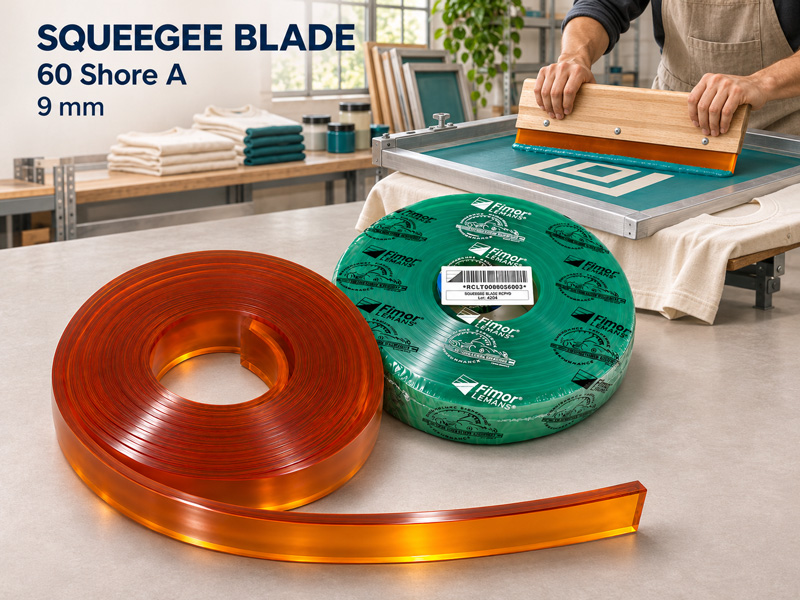
Key Features
60 Shore A Hardness – Soft and Flexible
60 Shore A falls within the soft squeegee hardness range and flexes more readily than 65, 70 or 75 Shore A blades under equivalent conditions. This characteristic suits jobs requiring high flexibility. Adjust pressure appropriately to prevent excessive blade flex.
Supports Higher Ink Deposition and Thick Ink Deposits
Soft blades generally deposit more ink than harder blades under equivalent conditions, making them suitable for jobs requiring thick ink deposits. Actual ink film thickness also depends on the mesh, stencil, ink properties and operating parameters.
Supports Coverage and Color Reproduction
An appropriate ink deposit helps achieve the required coverage and color. Results also depend on ink opacity, fabric background color, stencil quality and the condition of the printing edge.
Suitable for Selected Special-Effect Applications
The blade can be used with certain glitter, metallic and puff inks requiring higher ink deposition. Follow the technical guidelines for the specific ink system and use suitable mesh and stencil specifications to achieve the intended effect.
9 mm Thickness – Supports Blade Rigidity During Printing
The 9 mm thickness contributes to blade rigidity. Select a compatible blade holder and adjust the blade protrusion appropriately. Durability also depends on the material, chemical resistance and maintenance practices.
Technical Specifications
|
Item |
Specification |
|
Product name |
Screen printing squeegee blade |
|
Product code |
Squeegee Blade 9mm-60A |
|
Thickness |
9 mm |
|
Hardness |
60 Shore A |
|
Classification |
Soft squeegee blade |
|
Function |
Wiping ink and controlling ink deposition |
|
Applications |
Textile printing, thick ink deposits and selected special effects |
|
Compatible equipment |
Manual squeegee holders or screen printing presses with compatible mounting dimensions |
Screen Printing Applications
▫ Textile and garment printing: Suitable for jobs prioritizing ink deposition and print coverage.
▫ Thick ink deposits: Supports greater ink transfer when combined with suitable mesh and stencil thickness.
▫ Glitter printing: An option for ink systems requiring a soft blade, with mesh openings selected according to particle size.
▫ Metallic printing and effects: Can be considered when 60 Shore A hardness meets the ink manufacturer’s recommendations.
▫ Puff printing: Suitable for selected processes requiring higher ink deposition, combined with the appropriate stencil and curing conditions.
Compatibility note: A hardness of 60 Shore A does not, by itself, determine resistance to inks or solvents. Check the specifications of the exact blade material grade before use.
Selection and Use Guidelines
▫ Select according to ink deposit requirements: Run print trials to assess ink deposition, coverage, image definition and effects before production.
▫ Adjust squeegee pressure: Avoid excessive pressure that causes the soft blade to flex too much, affecting the working angle and ink control.
▫ Control ink penetration: Adjust settings according to the ink system and fabric surface. Deeper ink penetration does not always improve coverage or effects.
▫ Select suitable mesh: For glitter and metallic inks, select mesh openings according to particle size and the ink’s technical guidelines.
▫ Distinguish thick ink deposits from high-density printing: Sharp-edged high-density printing may require a harder or multilayer squeegee blade to control the printed profile.
▫ Use a correctly sized holder: Select a handle or blade holder suitable for a 9 mm thick blade. Clamp evenly and securely, and inspect the printing edge before printing.
Cleaning and Storage
▫ Remove excess ink and clean the blade with a suitable cleaning agent after use.
▫ Avoid prolonged soaking in solvents or the use of highly aggressive chemicals.
▫ Allow the blade to dry and recover after chemical exposure before reuse or sharpening.
▫ Sharpen only when the blade is dry and the material is suitable for reconditioning by sharpening.
▫ Store in a cool, dry place away from direct sunlight and heat sources. Avoid conditions that bend the blade or place pressure on the printing edge.
▫ Rotate squeegee blades during continuous production to allow time for rest and inspection.
Appropriate cleaning, printing-edge maintenance and adequate recovery time help protect the blade and support consistent print quality.
