





What is screen printing? The process and technologies used today
A print shop may need two different ink systems to print the same logo on a cotton shirt and a dyed polyester shirt. On cotton, opacity and print hand are often important. On polyester, the shop must also check whether dye from the fabric can migrate into the ink layer and discolor the print. The ink transfer principle is the same, but material selection and post-print treatment depend on the product.
What is screen printing?
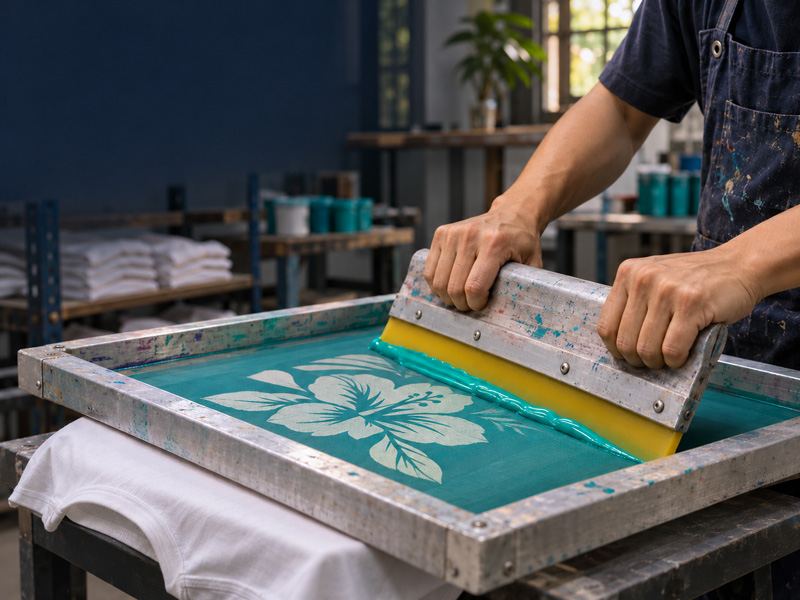
Screen printing, also known as silk-screen printing, is a technique that uses a squeegee to force ink through the open areas of a mesh stencil and form an image on a substrate. The mesh is stretched over a frame. The stencil blocks the areas where the background color should remain visible and leaves the image areas open for ink transfer. The term silk-screen printing comes from the use of silk mesh. Today, synthetic meshes, including monofilament polyester, are widely used.
During the print stroke, the squeegee blade applies pressure to push ink through the open areas. The amount of ink deposited depends on the mesh opening, stencil thickness, ink properties, and how the squeegee is operated. In multicolor printing, each spot color typically has its own screen. The shop uses registration marks to align the screens before printing the layers in sequence.
Basic materials and equipment
|
Component |
Function and selection criteria |
|
Screen frame and mesh |
Keep the mesh stable during printing. Consider mesh count, thread diameter, and mesh opening to balance image sharpness with the required ink deposit. |
|
Photo emulsion or capillary film |
Forms the stencil. Choose a product that can withstand the ink system in use and achieve the required stencil thickness. |
|
Squeegee |
Transfers ink through the mesh. Blade hardness, profile, and edge condition affect the ink deposit and image sharpness. |
|
Printing inks and additives |
Select them according to the substrate surface, background color, required opacity and adhesion, and desired effect. |
|
Printing platens, fixtures, and post-print equipment |
Platens and fixtures hold the substrate in position during printing. Post-print equipment provides the drying or curing conditions required by the ink system. |
The six-step screen printing process
1. Prepare the artwork and separate the colors
Define the print size, placement, and number of ink layers. For multicolor artwork, separate the colors or print channels, add registration marks, and set the print sequence. For example, a print on a dark garment may need a separate screen for a white underbase so the colors printed over it show up more clearly.
2. Prepare the screen and apply the emulsion
Choose a mesh based on the level of detail and the required ink deposit. Check the mesh tension, degrease the mesh, and let it dry. Apply the photo emulsion with a scoop coater. If the emulsion requires a sensitizer, mix it according to the manufacturer’s instructions before coating. Dry the coated screen under lighting conditions that prevent premature exposure.
3. Image, expose, and wash out the screen
When using film, place the film positive in contact with the coated screen and expose it with a compatible light source. The emulsion hardens in areas that receive sufficient light. During washout, the unexposed emulsion washes away, opening the mesh in the image areas. Determine the exposure time with a test exposure or an exposure calculator, since it depends on the emulsion, coating thickness, and equipment. Once the screen is dry, check for pinholes and inspect fine details before mounting it on the press.
4. Mix the ink, register the screens, and run a test print
Choose an ink system compatible with the substrate, then mix colors or additives according to the technical data sheet. Secure the substrate on the platen or fixture, align the screens, and adjust the off-contact distance between the mesh and the printing surface if the process requires it. Test on the actual production material to check opacity, color, edge definition, and registration. For dyed polyester, also check for dye migration after heat treatment.
5. Run production
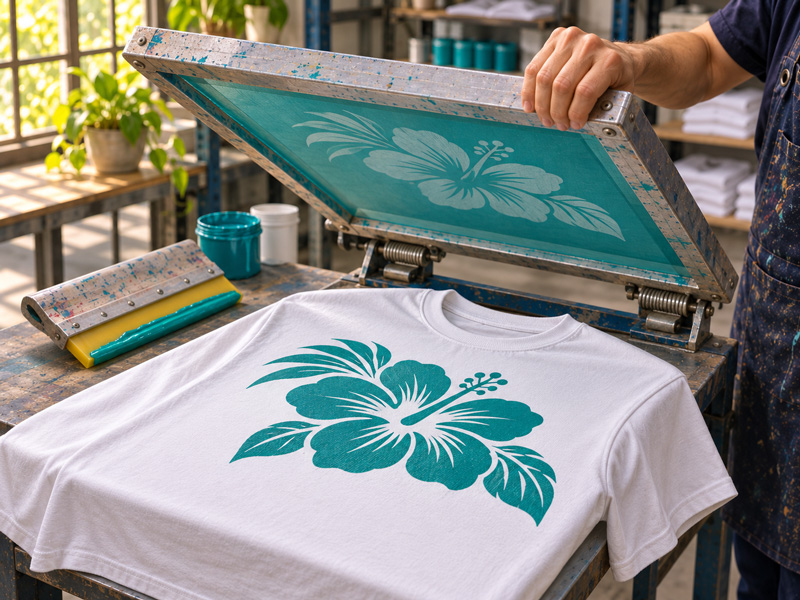
Flood the image area with ink, then make the print stroke using the settings established during test printing. The flood stroke distributes ink across the image area of the screen. The print stroke applies pressure to transfer the ink onto the substrate. The number of print strokes depends on the required opacity, image detail, and ink deposit. For multilayer prints, flash between layers if the ink system or print sequence calls for it.
6. Dry or cure the ink and inspect the finished print
Follow the drying or curing conditions specified in the ink system’s technical data sheet. For example, a water-based textile ink may require heat drying to achieve the required wash durability. When heat curing, check the conditions the ink film actually experiences, since the dryer setpoint may differ from the temperature at the print. After drying or curing, inspect the print visually and test adhesion, wash durability, or rub resistance as required for the product.
Screen printing methods and technologies used today
1. By level of automation
|
Method |
How it works |
Best suited to |
|
Manual printing |
The printer positions the substrate, lowers the screen, and operates the squeegee by hand. |
Sampling, short runs, or frequent design changes. |
|
Semi-automatic printing |
The machine performs certain operations, such as the squeegee stroke or raising and lowering the screen. The operator may still load and unload by hand. |
Jobs that require more repeatable print strokes while retaining manual loading. |
|
Automatic printing |
The press controls indexing between stations and the print cycle. Loading, unloading, and drying may be handled separately, depending on the line configuration. |
High-volume repeat production, especially jobs with multiple colors or processing steps. |
2. By screen geometry and printing surface
- Flatbed screen printing uses mesh stretched over a flat frame. It is widely used for garments, cut fabric panels, paper, and sheet materials.
- Screen printing on curved objects can use a flat screen with a rotating fixture. The bottle or jar rotates in sync with the relative movement between the screen and the object so the image follows its circumference.
- Rotary screen printing uses a rotating cylindrical screen while the substrate feeds continuously through the machine. This configuration is common on roll-to-roll textile printing lines.
3. By how the image is formed on the substrate
Direct printing transfers ink directly to the substrate. On dark fabrics, the shop can use a high-opacity ink or print an underbase.
Discharge printing uses an ink system containing a discharge agent that removes the fabric color in the printed areas. The result depends on how readily the dye discharges, so test on the actual production fabric lot.
For foil effects, a common method is to screen print the adhesive in the desired pattern, process the adhesive layer, and then heat-transfer the foil under the conditions specified for the adhesive and foil system.
4. Computer-to-screen imaging and hybrid printing
Computer-to-screen (CTS) takes the image directly from a digital file to the screen. Depending on the equipment, the system can form a light-blocking mask on the coated screen or image the stencil by direct exposure. This eliminates the need to output a separate film positive.
Hybrid printing combines screen printing stations with a digital printing station. In textile printing, the screen stations can print an underbase or special effects, while the digital station prints multicolor artwork and gradients. CTS is part of screen making, while hybrid printing takes place at the printing stage.
Advantages and limitations of screen printing
1. Advantages
Screen printing can produce bold areas of color, control ink deposit, and create effects such as raised prints and metallic finishes. Once the screens and settings are established, the same design can be reproduced across many items. By changing the ink system and fixtures, a shop can print on materials ranging from fabric and paper to plastic and glass.
2. Limitations
Screen-making costs and press setup time increase when a design requires additional screens or special-effect layers. This preparation has a greater impact on short runs with many colors. Gradients can be reproduced with halftones, CMYK process printing, or simulated process color separations. These methods require control over color separation, mesh selection, and on-press registration.
Where is screen printing used?
1. Textiles and fashion
Print logos, graphics, and decorative effects on T-shirts, jackets, fabric bags, hats, and garment panels.
2. Packaging and consumer goods
Print branding, graphics, or information on paper bags, boxes, bottles, jars, and drinkware. Test adhesion on the actual production surface.
3. Graphics and industrial applications
Print posters, signs, labels, control panels, or functional layers in printed electronics.
To choose a screen printing process, start with the substrate, required opacity, and desired effect. Then select the ink system, mesh, stencil, and post-print conditions. A test print on the actual production material lets the shop assess color, detail, and durability before running the full order. At WORIME, you can explore screen mesh, photo emulsion, squeegees, inks, and transfer foils for each stage of the process.
Frequently asked questions
1. Do screen-printed garments hold up in the wash?
Wash durability depends on ink and fabric compatibility, curing conditions, and how the garment is used. Wash-test a production sample after the ink has been processed as specified. Follow the garment care label, especially for foil prints or prints with special surface effects.
2. Why can a light-colored print on polyester change color after drying?
Dye from the fabric can migrate into the ink layer, giving a white or light-colored print a tint from the fabric. Depending on the fabric, the shop can test a low-bleed ink, a dye-blocking underbase, and dryer settings appropriate for the ink system.
